$2,705recovered for Snagr customers so far
Win back everyone who leaves your checkout, signup or trial
When a customer leaves before paying, Snagr sends them a friendly reminder with a link straight back. Once they pay, it stops. Free until it wins back your first sale.
No card · then $29/month · 0% of what we recover
- Polar
- Stripe
- Claude Code
- Cursor
- Any app
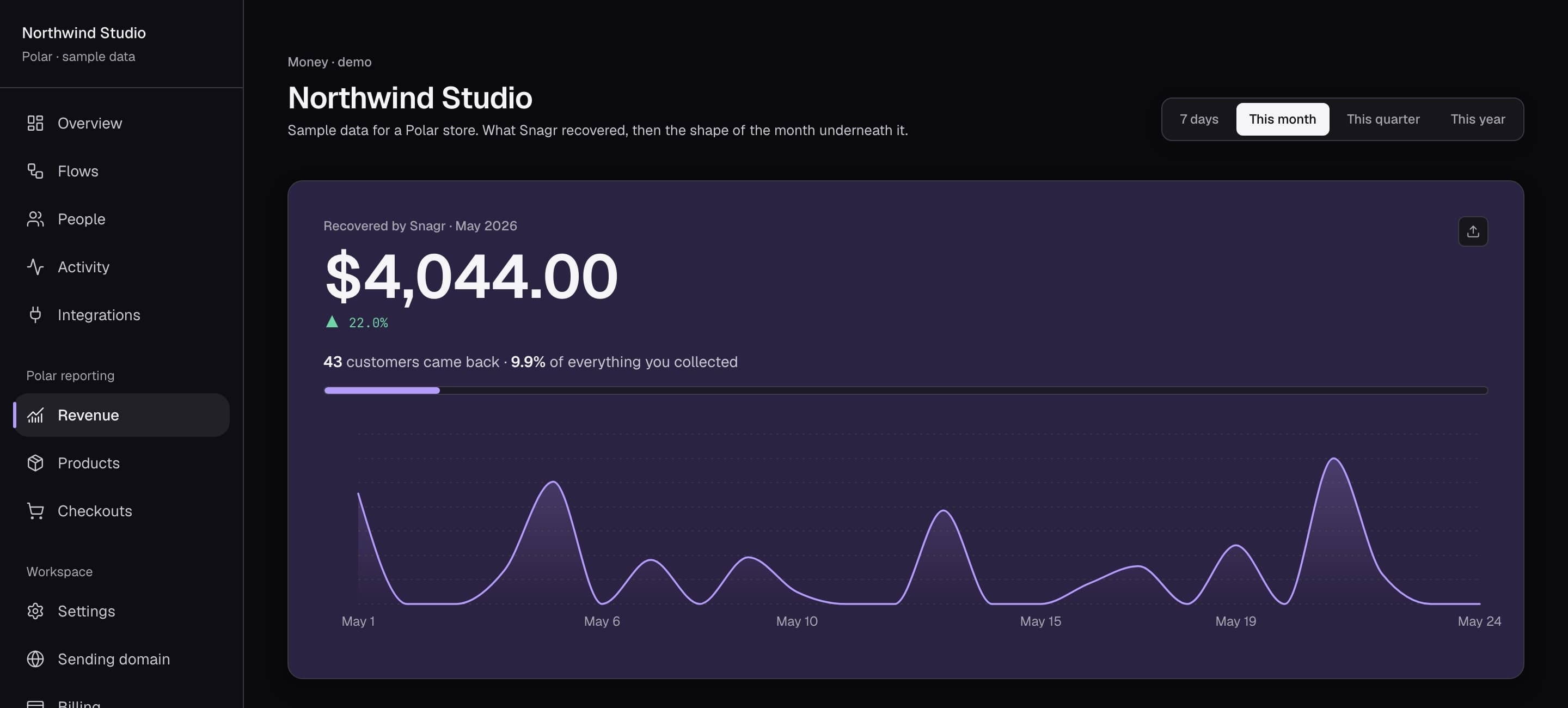
$2,705
recovered for Snagr customers
181
payments won back
0%
of it kept by Snagr
Counted only when a customer pays after a Snagr follow-up. All accounts, June 22 – October 7, 2026.
How it works
Someone leaves at checkout. Snagr brings them back.
When a customer gets to checkout and doesn't pay, Snagr emails them a friendly reminder with a link straight back to their cart. The moment they pay, the reminders stop. You don't lift a finger.
- Reminder emails are written for you. Edit them, or let AI tailor each one
- You choose when they go out: 30 minutes later, the next day, a week later
- Nobody gets nagged after they've paid
Sam picks Acme Pro, gets to checkout, then closes the tab without paying.
On-site nudges
Catch them when they come back
Plenty of people skip the email. If they come back to your site, Snagr shows a small banner with their saved cart and any discount you want to offer.
- Added to your site with one line, by you or your developer
- Goes away once they pay or close it
- Offer a discount code only if you want to
Results
See exactly what came back
Every email opened, link clicked and payment made shows up as it happens. A sale only counts if it came after a Snagr reminder, so the number you see is money Snagr actually won back.
- Each sale counted once, never twice
- See every customer's story, from leaving to paying
- A small test group shows what you'd have earned anyway
Live
3 recovered · 5 recent
As events come in
The latest opens, clicks and recoveries.
Recovered $83.00 from maya@finchworks.io
just now
kai@orbitly.app clicked “Your checkout is saved”
3 minutes ago
Recovered $49.00 from sofia@lumen.dev
11 minutes ago
j.tan@quillpad.io opened “Forget something?”
24 minutes ago
Recovered $149.00 from ari@nimbusmail.com
41 minutes ago
Works wherever people drop off
A checkout left unpaid is the most common one, but it's the same story for signups and free trials: someone starts, stops, and needs a nudge to finish.
Left at checkoutPaid
Abandoned checkouts
They were ready to buy. Send them straight back to the payment they left.
Checkout recoverySigned up, stalledSet up
Unfinished signups
Get new users to their first useful moment before they forget why they came.
Signup recoveryTrial went quietUpgraded
Trials that go quiet
Reach people while the trial is still running and there's time to convert.
Trial recoverySetup
Set up in minutes
Selling on Polar or Stripe? Connect your store and Snagr starts working, no code needed. Anywhere else, your developer or coding agent adds a few lines like the ones on the right.
Already on Polar?
Connect with Polar sign-in. Abandoned checkouts, failed renewals and cancellations are covered with no code.
On Stripe?
Paste a restricted key. Expired checkouts, failed renewals, cancellations and revenue analytics, no code.
Hand it to your coding agent
Claude Code or Cursor finds your checkout and webhook code, adds the events, and drafts the flows for you to review.
import { createClient } from "@snagr/sdk"; const snagr = createClient({ key: "snagr_pk_…" }); // When someone startssnagr.identify({ email: user.email, emailHash });snagr.track("checkout_started", { plan: "pro", revenue: 49 }); // In your payment webhook (server, secret key)await new Snagr({ secretKey }).track({ email, event: "purchase_completed", properties: { revenue: 49 }, messageId: order.id,});Pricing
Free until it pays for itself
Start free with every feature. Pay only once Snagr has recovered a payment, and keep 100% of what comes back.
Free
$0
until your first recovered payment
Start free- Every feature until your first recovered payment
- Polar or Stripe connect, and the SDK
- Recovery emails and on-site nudges
- Revenue analytics, free forever
Pro
Most popularper month
Start recovering free- Unlimited recovery, after your first win
- AI-personalized emails and nudges
- Flags, webhooks and custom flows
- Your own sending domain
- Agent setup over MCP
No card to start · 0% of what we recover · cancel anytime · compare plans
Questions
Something else? Ask us.
Yes, through the SDK. Your app sends checkout_started from the browser and purchase_completed from your payment webhook; Snagr follows up with anyone who started and didn't pay. Install and identify the person, then send start and finish events — or ask your coding agent to set it up. Polar connects with one click and no code.
Partly. Polar emails on failed renewals and retries the card; Stripe can generate a recovery link for an expired checkout. For Stripe Checkout recovery, you handle the follow-up email. Snagr also covers unfinished signups and on-site nudges. That's the gap Snagr fills, and every send is measured against a holdback so you can see what it actually adds.
No. Snagr works for free — every feature — until it recovers your first payment. Keep it running for $29/mo once it has already made you money.
No. Polar sends its own notice when a charge fails and retries the card four times over 21 days. We schedule around that cadence rather than on top of it. If you'd rather we stay out of renewals entirely, turn that flow off — abandoned checkout and win-back keep running.
You don't have to decide up front. Your first recovered payment is on us, so you see Snagr bring back real money before you pay anything. After that, new recovery emails wait until you upgrade.
Yes. Point Claude Code, Cursor or any MCP client at Snagr's install-snagr skill and MCP server with a secret key. It finds your signup, checkout and payment code, adds the events, creates the flows switched off for you to review, and sends a test event.
If a customer converts (completes a checkout, or a subscription returns to active) within 14 days of the most recent email we sent, the conversion is attributed to that sequence run. The attribution timestamp, source email, and amount are stored verbatim — that's the recovered-revenue number on your dashboard.
5% of triggered sequences are randomly assigned to a control group that receives no emails. We then compare recovery rate (us) vs recovery rate (control). The difference is the incremental lift — the part that's actually our doing. You see this number in the dashboard.
By default, the browser key can send events, but an email address must be verified by your server before Snagr sends to it — using a secret-key event or a signed emailHash. Keep the secret key on your server and leave unverified email sending disabled. Unsubscribes, bounces and complaints are suppressed for good.
Unsubscribes, hard bounces, and complaints land in a per-team suppression list. Future sequences for that email are skipped at trigger time and at every step send (re-checked twice, late-bound). The unsubscribe link works without an account.